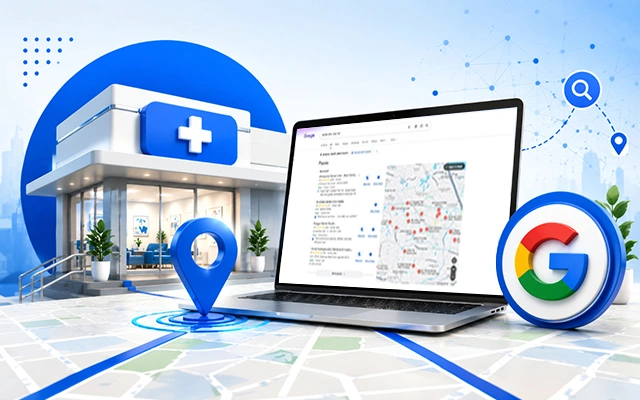
A patient wakes up with tooth pain, back pain, or a worrying symptom. What do they do first? In most cases, they open Google and search for something like “doctor near me,” “clinic near me,” or “best dermatologist in Kolkata.” If your clinic does not appear locally, another clinic gets that first call.
That is where Google My Business optimisation, now managed through Google Business Profile, becomes a serious growth tool for clinics, doctors, diagnostic centres, and healthcare practices.
What is Google My Business optimisation for clinics?
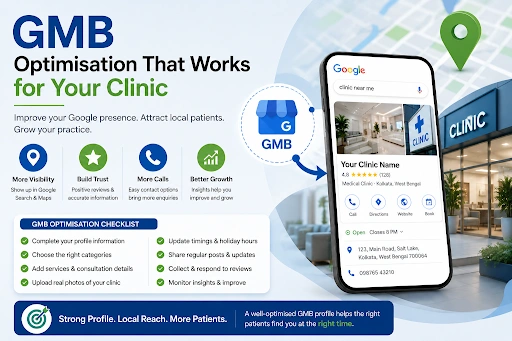
Google My Business optimisation means improving your clinic’s Google Business Profile so that patients can easily discover, trust, contact, and visit your practice through Google Search and Maps.
This includes your clinic name, address, phone number, appointment link, services, consultation hours, doctor details, photos, reviews, posts, and location accuracy. Sounds simple? It is simple only when done correctly. A half-filled profile is like a reception desk with nobody answering the phone.
Why local visibility matters for clinics
Healthcare searches are often urgent and location-based. A patient searching for a “paediatrician near me” or “ENT doctor in Salt Lake” is not casually browsing. They are likely comparing options, checking reviews, looking at timings, and deciding whom to call.
A strong Google Business Profile helps your clinic appear in local searches, map results, branded searches, and mobile searches. It also reduces friction. Patients should not need to hunt for your phone number, wonder whether you are open, or guess which services you offer.
| Patient Search Behaviour | What They Expect | What Your Profile Should Show |
| “Clinic near me” | Nearby, trusted options | Correct map pin, phone number, and hours |
| “Doctor for fever near me” | Relevant medical service | Service categories and descriptions |
| “Best dental clinic in Kolkata” | Proof of trust | Reviews, photos, responses |
| “Clinic open today” | Updated availability | Accurate working and holiday hours |
| “Book an appointment online” | Fast action | Appointment link or call button |
Complete your clinic information first
Your clinic profile should include:
- Exact clinic name as used on signage and legal documents
- Correct address and map pin
- Active phone number
- Website URL
- Appointment or booking link
- Consultation hours
- Holiday hours
- Primary and secondary categories
- Services offered
- Short, clear business description
- Photos of the clinic, reception, waiting area, equipment, and team
Choose the right clinic category
Your primary category tells Google what your practice mainly does. A dermatology clinic, dental clinic, fertility clinic, eye clinic, physiotherapy centre, and diagnostic centre should not use generic categories when specific ones are available.
The category should match your real-world service. For example:
| Clinic Type | Possible Primary Category |
| Dental clinic | Dentist or Dental clinic |
| Skin clinic | Dermatologist or Skin care clinic |
| Eye clinic | Eye care centre or Ophthalmologist |
| Physiotherapy clinic | Physical therapy clinic |
| Diagnostic centre | Diagnostic center |
| Fertility clinic | Fertility clinic |
Secondary categories can support your wider services, but they should not misrepresent your clinic. Local SEO works best when accuracy and relevance walk together.
Write a patient-friendly business description
Your business description should not sound like a hospital brochure from 2006. Patients want clarity. Tell them who you are, what you treat, where you are located, and how you help.
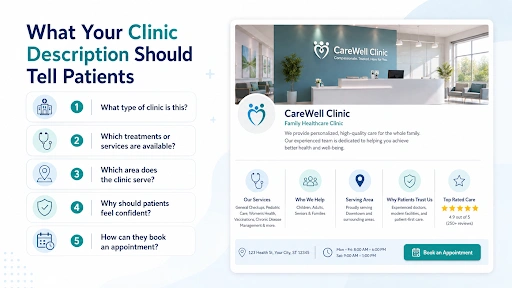
Avoid overpromising. Do not write “100% guaranteed cure” or “best clinic in India” unless legally and factually supported.
Add services with a searchable intent
Service sections are underrated. Many clinics only add a category and stop there. That is a missed opportunity.
If you are a dental clinic, add services like root canal treatment, dental implants, teeth cleaning, braces consultation, tooth extraction, pediatric dentistry, and smile designing. If you are a gynaecology clinic, add pregnancy care, PCOS consultation, infertility evaluation, menstrual disorder care, and menopause consultation.
This helps patients understand your scope. It also helps search engines connect your profile with specific local queries.
Keep your NAP consistent everywhere
NAP means Name, Address, and Phone number. Your clinic’s NAP should stay consistent across your website, Google profile, social pages, directories, landing pages, and appointment platforms.
Make sure your profile matches your real-world clinic identity. Google’s business representation guidelines are designed to keep business information accurate and trustworthy.
Upload real, high-quality clinic photos
Photos are trust builders. Patients want to see where they are going. A clean reception, visible signage, consultation room, diagnostic area, wheelchair access, parking entrance, and staff desk can make your clinic feel more approachable.
For clinics, add:
- Exterior photo with signage
- Reception photo
- Waiting area photo
- Consultation room photo
- Equipment photo, where appropriate
- Team photo, with consent
- Doctor's photo, professionally taken
- Accessibility-related photos
Avoid over-edited, misleading, or stock-heavy images. Patients can smell fake visuals from three scrolls away.
Use Google posts to stay active
Google Business Profile posts can be used to share updates, offers, announcements, event details, and helpful information on Search and Maps.
For clinics, posts can include:
| Post Type | Example Topic |
| Awareness post | When should you see a cardiologist? |
| Service post | Root canal treatment available |
| Seasonal post | Monsoon fever symptoms to watch |
| Doctor availability | Updated consultation timing |
| Patient education | Signs of vitamin deficiency |
| Campaign post | Free dental check-up camp |
Post content should be simple, helpful, and compliant. Do not create fear-based messaging. Do not target personal medical conditions in a way that feels intrusive. Keep it educational.
Manage reviews with care
Reviews matter because patients trust other patients. But review management in healthcare must be handled ethically.
Google allows verified businesses to reply to reviews. It also suggests asking customers to leave reviews through a Google link or QR code and replying to reviews to show that feedback matters.
Best practices for clinic reviews:
- Ask genuinely satisfied patients for feedback
- Never offer payment, discounts, or incentives for reviews
- Reply politely to positive and negative reviews
- Do not reveal patient health details in replies
- Flag reviews only when they violate policies
- Keep responses professional and short
Add appointment links and call options
Local visibility is only useful when patients can act quickly. Add appointment links, phone numbers, WhatsApp links if suitable, and website links wherever possible.
Your profile should reduce decision time. If a patient likes your reviews, checks your location, and wants to book, the next step should be obvious. A confusing profile leaks enquiries.
Track performance every month
Google Business Profile provides insights into how customers find your business, including searches, calls, bookings, and other interactions.
Use these insights to improve your content. If patients search for “knee pain doctor near me,” create better service content around knee pain. If direction requests are high but calls are low, check your phone number, clinic hours, and appointment CTA.
Make Every Local Search Count
Google My Business optimisation is not about tricking the algorithm. It is about making your clinic easier to find, easier to trust, and easier to contact. Patients already search locally. The real question is whether your clinic appears with enough clarity and confidence when they do.
MfunL, a digital marketing agency in Kolkata for medical practitioners, helps healthcare brands build stronger local presence through practical Google Business Profile optimisation, SEO content, website strategy, and patient-focused digital communication.
Connect with us today.
People Also Ask
1. What is Google My Business optimisation for doctors?
Google My Business optimisation for doctors means improving a doctor or clinic’s Google Business Profile with accurate information, services, photos, reviews, appointment links, and regular updates so local patients can find and contact the practice easily.
2. How does Google decide local clinic rankings?
Google says local rankings are mainly based on relevance, distance, and prominence. This means your clinic profile should match the search query, be location-relevant, and show trustworthy signals such as accurate information, reviews, and online presence.
3. How often should clinics update their Google Business Profile?
Clinics should review their profile at least once a month. Update timings, doctor availability, holiday hours, services, photos, posts, and appointment links whenever anything changes.
4. Are Google reviews important for clinics?
Yes. Reviews help patients understand real experiences and build confidence before booking. Clinics should request genuine reviews, reply professionally, and avoid incentives or fake review practices.
5. Can Google Business Profile optimisation guarantee first-page ranking?
No. No agency can honestly guarantee first-page local ranking because Google does not allow businesses to pay or request better local ranking directly. Good optimisation improves your chances, but results depend on competition, location, relevance, and ongoing trust signals.