
Think about the last time you looked up a doctor, a clinic, or a hospital. Chances are you were holding your phone, not sitting at a desk. Your patients do the same, and their questions are specific: Is this clinic nearby? Can I trust these doctors? How do I book?
This guide answers the questions healthcare providers ask most often about mobile websites, so you can turn quick phone searches into real appointments.
Do Patients Really Use Phones to Find Doctors?
Yes, and the habit keeps growing. Phones are always within reach, and health worries rarely wait for office hours. Patients search for symptoms, compare clinics, read reviews, and check timings, all from a screen that fits in their palm.
Search engines have adapted too. Google primarily uses the mobile version of your site to decide where you rank. If that version is slow, cluttered, or incomplete, your visibility drops, however polished your desktop site looks.
What Does a Mobile-Friendly Healthcare Website Look Like?
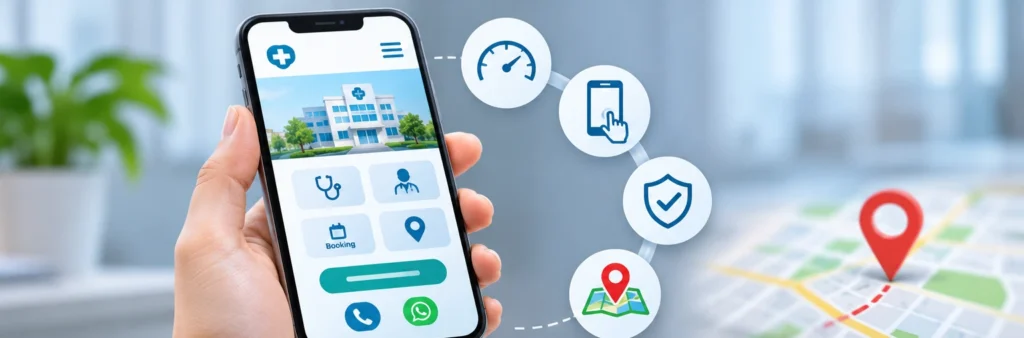
It does a few things well:
- Loads quickly, even on a weak network
- Shows what you offer and where you are within seconds
- Uses large, readable text and tappable buttons
- Makes calling or booking possible in one or two taps
- Displays doctor profiles, services, and reviews clearly
Many clinic sites fail these basics because they were designed for desktop first and squeezed onto a phone later. If that sounds like your site, patching it rarely works. Investing in Healthcare Website Design that starts from the mobile screen and scales up is usually the smarter fix.
How Fast Should a Website Load?
Aim for under three seconds on a mobile connection. Beyond that, visitors start leaving, and in healthcare, a patient who leaves rarely comes back.
To speed things up:
- Compress and resize images before uploading
- Use WebP or similarly light image formats
- Remove unused plug-ins and scripts
- Enable caching
- Use a CDN and decent hosting
Check your current score with Google PageSpeed Insights, and start with the fixes it flags as highest impact.
What Should Be Visible Without Scrolling?
The top of your mobile page is your front desk. Patients should see:
- Who you are: clinic name and speciality
- Where you are: area and a map link
- How to reach you: a click-to-call button
- What to do next: a clear “Book Appointment” button
Anything else can follow below. If a worried patient has to hunt for your number, you’ve already made things harder than necessary.
How Can Mobile Website Navigation Be Made More User-Friendly?
Keep it short and predictable. Four or five menu items are plenty: Services, Doctors, Patient Reviews, Contact, and Book Appointment. Use a collapsible menu, and make every button big enough for a thumb. Avoid dropdowns within dropdowns, which are frustrating on small screens.
How Can Website Content Be Made More Readable on Mobile Devices?
Write the way patients talk. Long paragraphs and heavy medical vocabulary are hard to read on a small screen.
- Keep paragraphs to two or three lines
- Start each page with a direct answer
- Use subheadings and bullet points
- Choose a font size of at least 16px
- Explain medical terms in simple language
- Add FAQs that reflect real patient questions
Clear content also performs better in search, because it answers what people actually type into Google.
What Makes a Good Mobile Booking Form?
A short one. Ask for a name, phone number, concern, and preferred time, and nothing more. Enable autofill, use date pickers and dropdowns, and show the numeric keyboard for phone fields. Give patients an alternative too, such as a WhatsApp button or a direct call. When they submit, show a clear confirmation message so they know the request went through.
How Does Mobile Optimization Help Local Search?
Most healthcare searches are local, such as “dentist near me” or “skin specialist open now.” To appear in those results:
- Keep your clinic name, address, and phone number identical across your website and listings
- Embed a map and add directions
- List your working hours prominently
- Collect and respond to patient reviews
- Mention the areas you serve naturally in your content
Inconsistent details confuse both patients and search engines, so audit your website and Google Business Profile together on a regular basis.
Are Pop-Ups and Chat Widgets a Good Idea?
Use them sparingly. Full-screen pop-ups cover content and annoy visitors, and Google penalizes intrusive ones on mobile. If you want to promote a health camp or discount, use a thin banner that’s easy to dismiss. A chat or WhatsApp widget is fine if it’s small and doesn’t block your call button.
How to Build Trust on a Small Screen?

Trust comes from details that feel real:
- Photos of your actual doctors and clinic
- Qualifications and years of experience
- Genuine patient reviews
- Clear, honest descriptions of treatments
- A tidy layout with calm colors and no clutter
Patients judge a clinic quickly, and a clean, organized site suggests careful care. Credentials near the top, reviews within easy reach, and nothing standing between a worried patient and your contact details all help.
How Often Should a Website Be Tested?
Check it monthly. Open it on at least two different phones, ideally one older Android, and try the entire journey: find a doctor, read a service page, and book an appointment. Use Google’s Mobile-Friendly Test and BrowserStack for extra coverage, and ask a friend or family member to try it as well. Whatever confuses them will confuse your patients.
When Should a Professional Be Hired?
If your site loads slowly, ranks poorly, or gets plenty of visits but few bookings, it’s time to get expert eyes on it. Optimizing for mobile can feel overwhelming when you’re also running a practice, so reach out to a healthcare digital marketing agency in Kolkata that understands both the technical side and the sensitivity of medical communication. They can audit your mobile experience, fix speed and design issues, and handle local SEO and patient-friendly content in one coordinated plan.
Final Thoughts
Mobile optimization comes down to respect for your patient’s time and worry. Make your site fast, make your contact details impossible to miss, and make booking effortless. Do that, and the visitors you already have will start turning into patients.
Begin with one small step today: pull up your website on your phone and see whether you can book an appointment in under a minute. If you can’t, you’ve found your first fix.
At MfunL, we help hospitals, clinics, and doctors turn their websites into patient-friendly, search-ready platforms through mobile-first website development, SEO, and healthcare marketing. Connect with MfunL today and start converting more mobile visitors into appointments.
Frequently Asked Questions
1. What is the ideal loading time for a clinic website on mobile?
Aim for under three seconds on a regular mobile connection. Compressed images, fewer plug-ins, and caching are the quickest ways to get there.
2. Does mobile optimisation really affect my Google ranking?
Yes. Google primarily uses the mobile version of your pages for indexing, so slow loading, hard-to-read text, or missing content on mobile can lower your visibility.
3. How can I check whether my website is mobile-friendly?
Open it on your own phone and try to call or book an appointment. Then run it through Google PageSpeed Insights and the mobile usability reports in Google Search Console to catch technical problems.
4. How many fields should an appointment form have?
Four or five is enough: name, phone number, health concern, and preferred time. Every extra field reduces the number of patients who finish the form.
5. Do I need a click-to-call button on every page?
Yes, especially on service and doctor pages, where patients are most ready to act. Keep it visible while they scroll so they never have to look for your number.